play ps1 games on android
Showing posts with label save. Show all posts

How To Save Your Facebook Account From Being Hacked


Image From: techsavvyagent.com
Now a days hacking is common.The email ids are the primary targets.Most people are losing heir email ids due to hacking because their email ids are being hacked.But today we are using facebook more than our email ids.So,there is a chance that our facebook account will be hacked one day due to our carelessness.Here are some tips that will save your facebook account from being hacked.

1.Difference Between Original And Fake Facebook Login Page: If you are using facebook then you should be aware of fake and original facebook login page.Here is the address for original login page.

     1.1 http://www.facebook.com
     1.2 http://www.facebook.com/login.php

the addresses other than these are totally fake and if you use them for login purpose then you will be sorry.Below is the example of fake facebook login page.

     1.2 http://www.box.net/facebook.html
     1.3 http://www.110mb.com/files/facebook.html

or anything like these addresses which is different from original facebook.com address.So beware because once you are trapped there will be no chance to get your account back.The problem is that the fake login page is much similar to the original login page.The only way is to check the address always before logging in to your account.Below is the pic of fake and original facebook login page.

FAKE FACEBOOK LOGIN PAGE
ORIGINAL FACEBOOK LOGIN PAGE

The fake login page works as follows.Suppose you are under an eye of a hacker then one day you get an email that your facebook account is accessed from somewhere else,please change your password,then he sends a fake login address.When you login on this fake address,a javascript code embedded with this fake page cathces your login name and password and stores it on the hacker's website server in a notepad file and your account is gone.So always check your facebook login address before logging in.

2.Suspicious Links And Spam: You can see many links on facebook that show themselves tempting.For e.g. "click this link and win an ipad",however this is only an example the links can be different from this.Othe is "Lets video chat which automatically shows up in the chat box in your friends name",a zip or rar file attached on the link which automatically downloads itself on your pc and when you scan this file you will get a virus.Other spams are "win free facebook t-shirts",and hacking your account by tempting you to show sensitive data,but actually it is not so.They might ask you to enter your user name and password and if you do this you will be hacked.To avoid this you can do two things i.e. firstly never click on these links and secondly use a good antivirus with internet security which will scan the malicious links and tell you which is safe,but it is not guranteed safe.You can use AVG and Norton Internet Security.To download click below.

download AVG Internet Security
download Norton Internet Security

3.Increase Your Facebook Security And Make It Stealth: Here are some tips to increase your facebook security.
   1.Never login on public computers.
   2.Never share your user name and password.
   3.Don't store passwords on your pc.
   4.Always clear the cookies after session is over.
   5.Don't allow third party apps to access your basic info.
   6.Increase your facebook security by managing "how you connect with others".
   7.Do not accept friends requests from unknown people.
   8.Control your personal information to be shared.

However no system is 100 % secure but by following these above tips you can greatly reduce the risk of being hacked.You can save your account from being hacked if you are alert and aware.

How To Save yourself From High Broadband Bills


broadband bills can empty your pockets if you are using it beyond the limit .The worst plan in broadband is "pay as you go" which means there is no defined limit for the data you download,you will pay according to the data you download.The more you download the more you will pay.This occurs mostly in postpaid plans.So if broadband bills are killing you then you can do following two things.

1.take a prepaid plan: If you are using a prepaid plan then it will have some download limit,which will save you from high broadband bills,but this plan may not work for you because after finishing or reaching the limit you may not be notified by the service provider and you will be charged beyond post usage.

2.take unlimited paln: You can take unliited plan if you want to save yourself from high broadband bills.Unlimited plans are best because there are no hidden costs in these plans and you can download anything 24x7 without any extra cost.So better stick to an unlimited plan to save most of your money.Most service providers offer affordable unlimited plans,you can choose a better one.Here is the list of some unlimited and other plans.

for reliance net connect: reliance net connect tariffs
for tata photon plus: tata photon plus tariffs
for airtel broadband: airtel broadband tariffs

check according to your circle.

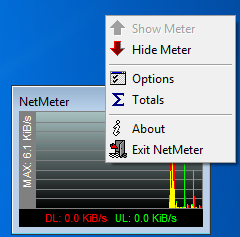
another way to save yourself from high broadband bills is to keep track of every single bit you download,and recording the total data so your service providers can't cheat you.You can use Netmeter to keep track of your downloaded and uploaded data.Also you can set an larm or notification for your limit.Once you reach the download limit you will be notified by Netmeter that you limit has been achieved.Netmeter is highly recommended for you if you want to keep your broadband bills under control.You can download it from here.

Download Netmeter

after downloading run Netmeter and you will see detailed information about the data you have downloaded and uploaded.You can also check detailed reports by right clicking on the Netmeter icon and selecting totals,you will see a detailed report which will show you the data transferred today,within a week and within a month and their total.It's a great utilty to monitor your network activity.It is highly recommended for high data downloaders which are using " pay as you go".After using this utility you will not be cheated according to the data you record on the daily basis.You can match the downloaded data which comes up in the bill with the data you recorded through netmeter.Be sure to enable the option "load on startup",because if anybody uses that modem then Netmeter will automatically record the data on whenever the modem is used.

   detailed report of your network showing uploaded
                       and downloaded data.


       pic showing how to set alarm for your defined   
                download and upload limit.


 a notification showing that your download limit has been reached and now you should stop browsing.


   Netmeter in the system tray showing handy reports and various options.