play ps1 games on android
Showing posts with label facebook. Show all posts

How to Use Secret Conversations in Facebook Messenger

How to Use Secret Conversations in Facebook Messenger End-to-end encryption is now becoming a popular security feature in instant messaging apps. WhatsApp was the first to release this feature to the end user. Now Google Allo has implemented end-to-end encryption as incognito chats. The same feature is implemented in Facebook messenger for android and iOS as secret conversations. By default Facebook chats aren’t encrypted but you can choose your messenger chats to be end-to-end encrypted. You can also set expiry time for these chats and they will self destruct when the time completes.

The good thing about Facebook secret conversations is that they are device specific. Which means that they can’t be viewed on any other smartphone except the one which was used to initiate those conversations. These secret conversations aren’t available on the desktop version of Facebook.


How to Use Secret Conversations in Facebook Messenger

  • Open the messenger app and tap any chat-head. Then tap the “i” icon and tap “Secret Conversation”.

facebook messenger secret conversations
  • A new conversation will start with a black theme.
  • Tap the timer icon and set the expiry time ranging from 5 seconds to 1 day.
  • Then after setting the timer tap the text button “Aa” otherwise the chat will close and you have to start it again. 
  • The timer will only start when the recipient has viewed the message. The messages will automatically disappear after the expiry time gets over. 
  • You can only send messages, photos, stickers and location. You can’t send GIFs, videos, voice or video calling and payments. 

Note: You will be seeing two conversations for the same contact. The one with a black padlock is the encrypted chat and another is the unencrypted chat.

Advantages of Facebook Messenger Secret Conversations

  • End-to-end encrypted chats with self destruct feature and user configurable expiry timer.
  • Secret Conversations are device specific. They cannot be viewed on any other device except the one which was used to create them.
  • Messages are deleted from both ends i.e. from sender’s and receiver’s end.

If you liked the article then please share it.

Facebook Messenger Tips, Tricks And Hidden Secrets

Facebook Messenger is one of the most essential, free messaging  app for android, iOS, and Windows Phone after Whatsapp. The Facebook Messenger app has gone under various improvements to finally come up with an app that is fast, light weight and has material design. The latest improvements include voice calling feature just like Whatsapp calling feature which is VOIP (Internet Calling).


The Messenger app is an awesome app to chat with your Facebook friends quickly since it saves much time which is wasted in visiting ‘facebook.com’, then logging in and look for online friends to chat. In this app once you log in you can’t sign out and anytime you can chat with friends, send photos, videos and audio recordings without logging in again and again. You will receive Facebook Messenger notifications on your android cell phone’s home screen.

In this post I am going to tell you about Facebook Messenger Tips, Tricks and Hidden Secrets. But first you need to download and install the app from play store. Most of these tricks are applicable to the iOS and Windows Phone version of fbk Messenger.

Facebook Messenger Tips, Tricks And Hidden Secrets

1. Start A Chat : To start a chat just tap the list icon just next to the group icon. Now here you will see 2 tabs ‘MESSENGER’ and ‘ACTIVE’. Active friends are online and if you want to send messages to offline friends then tap the ‘MESSENGER’ tab and select your desired friend to send a message. Also tap the ‘Clock’ icon on top left to start chats from recent contacts.


2. Send Photos : To send photos in a chat tap the image icon next to camera icon. Tapping this image icon will show a a horizontal list of all photos stored in your android gallery. Tap on any photo, you will see two options ‘Edit’ a pencil icon and the ‘Send’ button. If you want to send the image intact then tap the ‘Send’ button. If you want to edit it tap the pencil icon. In edit section you can scribble over the image by moving your finger on the image as a pencil, also you can choose the desired color for scribbling from the color picker. If you want to add text then tap the ‘Aa’ tab. The text color is by default white and cannot be changed.


Alternatively if you want to send photos directly from the gallery then select the photos and tap the share button then choose ‘Messenger’.

In chat tap the camera icon to send live photos or selfies. Tap the camera icon in chat and tap once to shoot a photo or selfie or tap nad hold to record a video, release the button to send the video.

3. Send Videos : Sending videos in Facebook Messenger is also easy, just tap the image icon and start exploring the desired video by either sliding images towards left or just tapping the ‘All’ photos & videos icon to see all the photos and videos. If you find this time consuming then directly share videos from android gallery.

4. Send Emoticons : The Messenger app contains a great collection of emojis and emoticons. To send these emoticons in chats tap the ‘Write a message’ text field then tap the 4 emoticons icons. This will open the complete list of emoticons. Just tap any emoji to enter it in text field then hit send button.


5. Send Stickers : To send stickers just tap the smiley icon and choose your favorite sticker to send. Hit the ‘+’ button to download more stickers. You can search stickers for ‘Happy’, ‘In Love’, ‘Sad’, ‘Eating’, ‘Celebrating’, ‘Active’, ‘Working’, ‘Sleepy’, ‘Angry’, ‘Confused’.

6. Search Images Via Bing : Facebook Messenger has built in Bing image search. So if you want to send an image that does not resides on your phone then use bing image search. In chats, tap the ‘Menu’ button and select ‘Image Search’. Enter the name to search, tap any image to send instantly.


7. Turn ON/OFF Location : New Messages include your location. So you can choose whether to send your location along with messages or not. To turn off the location tap the ‘Settings’ icon on the app’s main screen and uncheck ‘Location’.

8. Send Bigger Likes : To send bigger likes in messenger chats, tap and hold the blue like button until it grows its size. Release the like button to send a massive like.


9. Place a Voice Call : During a chat anytime tap the blue telephone icon to make a voice call to that particular contact. If he/she picks the call then you can talk. Call pickup is possible only when the contact is online and using messenger app.

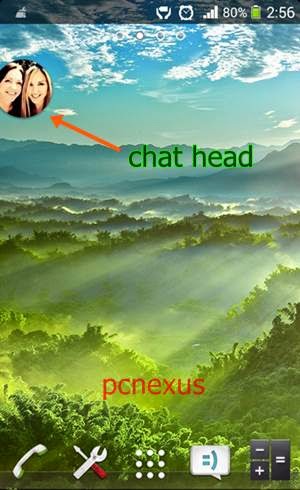
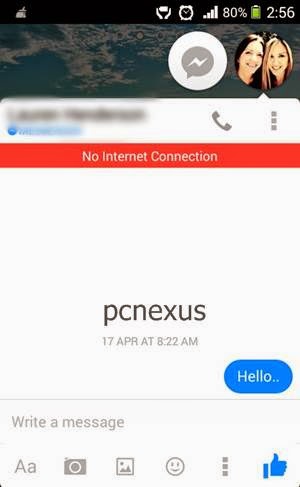
10. Open Chat Head : A Chat Head is a tiny profile pic of your facebook friend with whom you are chatting, that appears on the right side of the homescreen. You can place chat heads on home screen to get notifications fast. To open a chat head for your friend tap the menu button on the top, don’t be confused there are two menu buttons in the chat box, one is above and one is below. Tap the upper one and select ‘Open Chat Head’. It will show up on home screen with a round image. Tap and drag the chat head either left or right on the screen. You can use multiple chat heads on home screen.


To delete the chat head from home screen just tap the chat head and drag it to the ‘Cross’ icon below.

11. Change Notification Sound : To change the notification sound go to ‘Settings>Notifications & Sounds’. Here tap ‘Notification Sounds’ and choose your favorite ringtone. Also change the ‘Free Call Ringtone’ from the same menu. So, that you won’t be confused between facebook voice calls and regular calls.

12. Add Contacts By Phone Number : To add a person in messenger by phone number tap the ‘Contacts List’ icon before the ‘Settings’ icon. Now hit the ‘+’ icon below and enter the phone number. This feature will only work if that person is associated with facebook with its phone number.

13. Create Group : To create a group in facebook messenger just tap the ‘Group’ icon on top and select ‘New Group’. Name your group and select friends to add from the list below. Finally tap ‘CREATE GROUP’ on top right.

14. Refresh Recent Chats : To refresh recent chats  just slide the screen from top to down from the first contact.

15. Turn Off Chat : You can turn off chat and make yourself offline in facebook messenger, so that nobody can see you online. To turn off chat tap the list icon next to group icon. Now select ‘Active’ and turn off the chat.

16. Create Chat Shortcut : To create chat shortcut on home screen just long press and hold any contact in recent chats and choose ‘Create Shortcut’. The shortcut will be created on home screen. This shortcut will let you access specific facebook chats quickly from home screen.

17. Download Emoticons Pack For Messenger : You can download the emoticons pack for messenger from these two links. Messenger Emoticons Pack and Whatsapp Emoticons Pack.

18. Save Incoming Photos To Gallery : The Messenger can automatically save incoming photos to your android, iOS gallery. Just go to ‘Settings’ and enable ‘Photos’.

This were 18 tips and tricks for facebook messenger for android and iOS. If you like the article please share it. Read Whatsapp Tips, Tricks And Hidden Secrets

Facebook Messenger 26.0.0.4.13 APK Free Download

Messenger 26.0.0.4.13 is the latest version of the facebook messenger. You can download it from play store or we provide you apk download link here. Messenger is cool app to chat with your facebook friends without logging in again and again in your facebook account. This new android app is light, fast and have good UI.


Details Of Facebook Messenger 26.0.0.4.13

  • File name: com.facebook.orca-26.0.0.4.13-9069060-minAPI14.apk
  • Version: 26.0.0.4.13
  • File size: 18.84 MB
  • Minimum Android version: Android 4.0+ (Ice Cream Sandwich, API 14)
  • MD5: ef2812cfb9a89e2d71838d2b4ababacb
  • SHA1: 2950529d4f682339a1043a291377c51c07ae4fbc
What's New

  • Groups: Now you can create groups for the people you message most. Name them, set group photos and keep them all in one place
  • Forwarding: Forward message or photo to someone who isn't in conversation.
  • Conversation Shortcuts: You can now create shortcuts to your favorite chats on homescreen.
  • Free Calls: Make free voice calls to your friends via VOIP (Internet Calling).
Messenger 26.0.0.4.13 APK Download 

Download Stock Facebook Messenger Emoticons Pack

Facebook Messenger is an awesome app to chat with friends quickly without having to login again and again in a web browser. The Facebook Messenger app have gone under various improvements and finally came up with a light weight, faster and material design UI app. It now supports voice calling too. I previously posted links for Stock Whatsapp Emoticons In PNG format, now I have all PNG emoticons that can be seen in the Facebook Messenger app. There are a total of 478 emoticons in this app and I have extracted all the emojis. The size of this emoticons is 48x48 pixels. If you have the facebook messenger emoticons pack in png format then you can save it on your android, iPhone, iPad, Windows phone and blackberry to quickly share it with friends in chat.

facebook stock emoticons

Download Stock Facebook Messenger Emoticons Pack PNG

download the pack and extract it on your pc or android phone.

How To Identify Fake Profile Pics And Cover Photos On Facebook, Google+ And Twitter

Facebook is a social networking site which have more than 80 Million users worldwide, while Google+ is a social network and identity service, and Twitter is a micro blogging site. Today we mostly use Facebook for connecting with friends and same applies to Google+. We make new friends on Facebook by just viewing their profile pic. If we like their profile pic then we send them friend requests, because the profile pic is the only thing that is visible to the public. So to know more about that person you should send a friend request. But you should not make unknown friends on Facebook because these people might be hackers or the persons who want to track you with your Facebook account.


You should investigate more about that person. The most easy way is to identify whether its profile pic is original or fake. Most people use the profile pic of most famous Hollywood actors that can be easily identified. But if the picture seems to be original and you still have a doubt then its better to investigate about it. I am telling you a trick through which you can identify fake profile pics on Facebook, Google+ and Twitter.

Identify Fake Profile Pics And Cover Photos On Facebook, Google+ And Twitter

  • Open your Facebook account and search for that profile.
  • Right click on that profile pic and select 'Search Google for this image'.
  • Google will show all the possible results about the picture.
  • Now you are intelligent enough and can say on the basis of Google search results whether that Facebook profile pic is original or fake.
  • You can apply the same procedure to check fake profile pics of Google+ and Twitter
If you like the article then please take 2 minutes to share it.

Awesome Trick To Play/Watch Facebook Videos On Android Phones And Tablets

This tutorial will teach you to play/watch facebook videos on android phones and tablets.To play facebook videos on your android phone or tablets you need the flash player plugin for android.Facebook videos can't be played in the official facebook app and when you try to play a video by clicking it then it will take you to either youtube app or try to open that link in an android browser.If the video belongs to youtube then clicking the link in facebook app will automatically launch the youtube app on your android phone.

Many people ask me that how to play facebook videos on their android tablets,because most times they see a blue lego box in place of facebook video player.We can play facebook videos on our android phones and tablets exactly the same way as we watch them on our desktop computers.So in this post I am going to tell you the working solution for this problem.Firstly I will tell you the solution for this problem and later I will explain the concept behind the trick.

Files You Need

  • Mozilla Firefox for android.Download
  • Adobe flash player 11 apk for android 4.1 jellybean.Download.
  • Adobe flash player 11 apk for android 4.0 ics.Get it here.
  • Adobe flash player 11 apk for android 2.3 gingerbread.Download.
Note : Download the adobe flash player apk according to the android version of your phone.For example if your phone is running android 4.1 jellybean then download flash player apk for jellybean.No need to download all files.

Trick To Play/Watch Facebook Videos On Android Phones And Tablets

Trick 1 : By Using Mozilla Firefox For Android

Before following the below mentioned steps do one thing that login into your facebook account from a computer and put a youtube video link on your timeline and do not remove the preview.You will play this video in your android tablet on facebook,you can play any video but I want to show you the proof that's why I am asking to put a video to your timeline.It will look like as follows.


  • Download and install firefox for android from the link given above.
  • Download and install the respective flash player apk for your phone.
  • Make sure that you have enabled the data connection on your phone.
  • Now open firefox and goto "facebook.com" by simply putting the address in the address bar.
  • Wait for few seconds till the page loads to facebook homepage.
  • Now click the menu button of your phone and select "More>Request desktop site".Put a check mark on it.The page will auto reload,do not stop it.
  • After few seconds you will see the desktop version of facebook on your android tablet.
  • Now login to your account from your android tablet.Just click on the video you recently posted on your timeline.
  • You will see that the video will play on facebook itself and won't take you to third party websites for watching.You can see the proof below the same video is playing on my android phone in mozilla firefox.


Trick 2 : For Any Other Android Browser

  • For other browsers you can load facebook in desktop mode by entering this address "http://www.facebook.com/?m2w" in the browser's address bar.
  • ?m2w after "http://www.facebook.com/" will tell the browser to load facebook in desktop mode on your android tablet.
  • Now login in to your account and repeat the steps in Trick 1.
  • But this trick is not as useful as Trick 1 because most android browsers doesn't support the flash plugin fully as compared to mozilla firefox.
  • So to play facebook videos on android phones and tablets,you should use firefox browser,because it will work without any problem and I have shown you the proof of facebook videos playing on android devices.
How This Trick Works

This trick works on a simple principle that "make facebook think that you are accessing it from a computer and not an android device".But actually we are accessing it from android,which it doesn't know and loads the desktop version on our tablets and phones.For this trick we used "Request desktop site" option of firefox browser and for other browsers put a "?m2w" string after facebook address.So facebook thinks that we are accessing it from a computer that's why we are able to play/watch videos on facebook.

Share this wonderful article if you like it.

Use Authenticator App To Enable 2-Step Verification On Facebook

Adding 2-step verification to your facebook account adds an extra layer of security which makes it difficult for anyone to break into your account.2-step verification is the best way to defend your facebook account as someone can steal your facebook password but he can't break the 2-step verification.Like google,microsoft,and apple facebook is also providing us the feature of 2-step verification to secure our accounts from hacking.

In 2-step verification you need to verify yourself twice as the legitimate owner of your facebook account.First you login with the password and then you need to enter 2-step verification codes either generated by authenticator app or sent to you by facebook on your mobile phone via sms.You need to enter this code to successfully login into your facebook account.There is no way to bypass 2-step verification.

In this tutorial I will teach you how to enable 2-step verification for your facebook account by using an authenticator app and a sms.Android users will use google authenticator and windows phone users will use microsoft authenticator for this purpose.These authenticator apps are available free to download in their respective app stores

Use Authenticator App To Enable 2-Step Verification On Facebook
I am using google authenticator for android to set up 2-step verification on facebook,because the process is same for windows phone 8.You need to download one more app called "Scan".This app will be used to scan the 2d/qr code during the 2-step verification setup.This scan app is also available free to download in google play and windows phone app store.

  • Download and install the respective authenticator app and the scan app for your android or windows phone.
  • Goto "http://www.facebook.com/settings" and login in to your account.This will directly take you to the settings section.
  • In settings click "Security" on the left side.On the right side under "Security settings" click "Code Generator".
  • Now click "Set up".A popup will open and you will see a qr code with a verification key.You need to scan this qr code with the Scan app.Make sure to enable data connection on your phone before scanning the qr code.


  • When you scan the qr code with scan app a popup will open in your android phone/windows phone asking you to "Save key for Facebook".Click ok to save the key.
  • Now in authenticator app you can see random codes are generating under the name Facebook.Now pick any random code generated by this authenticator and enter the code in the facebook 2-step verification setup and click confirm.


  • Now your facebook account is secured with 2-step verification.
Now whenever you login from an unknown device which is a phone or a pc which you haven't used before to login in to your facebook account then facebook will ask you to enter the verification code generated by this authenticator app.Without entering the code no one can log in to your facebook account.

You can check out following 2-step verification tutorials for
Share this article if you like it.

Enable Login Notifications To Find Out Who Is Logging Into Your Facebook Account

Do you have a doubt that somebody is logging in to your facebook account and you are not aware of it.Then you want to know who may be doing this.That person can be anybody like your best friend,your mom or your elder brother or sister.If you want to know who logs in to your facebook account then you need to make it secure against these kind of attacks.By enabling login notifications on facebook you will be able to know who logs into your account without your consent.

Login notifications is facebook's security alarm which notifies you about the login activity when someone logs into your account from any computer,mobile device or the facebook app.You will be notified about the suspicious facebook login activity through a sms on your registered facebook mobile and an email sent to your registered facebook email account.Also you will get the suspicious login notification when you log in to your facebook account.

Enable Login Notifications On Facebook To Find Out Who Is Logging Into Your Facebook Account

Part 1 : Setup Your Mobile Phone Number

  • First you need to register your mobile phone number with facebook to get login notifications via sms.You should not ignore this step because it is the best method to receive notifications and you can do the needful to defend your facebook account.
  • To register your mobile phone go to "http://www.facebook.com/settings" and login into your account.When you login you will be directly taken to the settings page.
  • Now click "Mobile" on the left side and click the green button "Add a Phone".
  • Now a popup will open click "add your phone number here".See the image below.


  • Enter your mobile phone number to receive the confirmation code.On receiving the code enter it into facebook to verify the mobile.Change the visibility to "Only Me".
  • Now your mobile phone is set to receive login notifications via sms messages.
Part 2 : Enable Login Notifications On Facebook

  • On the same settings page click "Security".Then click "Login Notifications" on the right side.
  • Check "Email" and "Text/Push notification".then click save changes.
  • Now whenever anybody logs in to your account (including you) you will receive sms messages about the login activity.
  • For detailed info you should check the email sent to you by facebook.
Part 3 : Find Out Who Logged Into Your Facebook Account

  • Login into your email account that is registered with facebook.
  • Open an email stating that "Facebook login from an unrecognized device".
  • This email contains the information about the person who logged into your account.The info includes the ip address of that person's computer,its geographic location in form of city and country,browser and operating system.
  • If that person is not using a proxy then you can easily find him by tracing his ip address.See the image below.


  • Now goto "http://www.ip-adress.com/ip_tracer/".Scroll down a little and enter that ip-address and click "Track IP" button to get the information about that ip address.You will get its location and internet service provider.

Part 4 : Find Out Who Is Accessing Your Facebook Account In Real Time

  • In settings click "Security" then click "Active Sessions".
  • Active sessions will show you the information of users who are currently active on your facebook account i.e. accessing your account.
  • There should be only one active session and that is you.It will show your location in active sessions.
  • If you find that there are more than one active sessions in your facebook account then your account may be compromised.Change your password immediately.
If your facebook account is hacked then you can see how to get it back here.

Essential Facebook Tips And Tricks For Every Facebook User

Essential Facebook Tips And Tricks For Every Facebook User Facebook is a social networking site.We use it to connect with the people in our life.If you are new to facebook then you might not know about latest facebook tips and tricks 2013.These tips and tricks are essential and useful to every user in 2013.You will like these tricks which I am going to tell you through this post.So lets start.

1.Send Exe Files On Facebook : Exe files are executable windows files.Every windows software has an extension of .exe.Facebook doesn’t allow you to send files having an extension of .exe.But it doesn’t mean that we can’t send exe files on facebook.Here is a simple trick through which you can send exe files to multiple friends at one time.For this trick I will be using facebook messages.

1.Login to your account.
2.Goto facebook.com/messages.
3.Click new message on the top and enter your friend’s name.
4.You can enter multiple names in the message by selecting multiple friends.You can choose your friends from the message list on the left.
5.Now compress the exe file using winrar.It will change the extension of that file from .exe to .rar.Now you have to send this rar file only containing the original exe file.


6.Now at the bottom you will see “Add Files”.Click this and select your compressed exe files and press enter to send.This trick will send exe files on facebook.

2.Send Photos In Chatbox : Open chatbox with any friend and click the settings button in chat box.Now choose "Add Files".Click this and choose multiple photos to send in chat box.Through this method you can also send exe files in rar format.


3. Get Updates From Non-friend Users On Facebook : You can’t get updates from a person with whom you are not a friend on facebook.But you can still get some updates from that person.The updates will be limited to page likes,photo tags,public information,comments and facebook games.Now to get updates from a non-friend person on facebook do as follows.

1.Add that person as friend on facebook.
2.Now goto homepage and click “Friends” on the left side bar,a list will open.Now click “Close Friends”.
3.On the right you will see a list of your close friends.You can add that person in this list just type his name in to “Add friends to this list” text box and select it.


4.It will be automatically added to your close friends sections.Now you will see updates from that friend in this close friends sections only.You will see updates only that are made public by her/him or shared with you.

4.See Your Old Status Updates : Before getting a timeline update it was difficult to see your past post updates on facebook.But today with timeline and facebook activity log it is possible to see the status updates that you updated in the past some 8 or 9 years ago.To see your past status updates on facebook proceed as follows.


go to your profile and click activity log.A page will open now select “Your posts” on the left side bar.This will open all the status updates till date you have made on facebook.You will see the timeline years on the right.Just select the year and month and see what status you had updated in that month and year.

5.Turn On Chat For Only Some Friends : If you don’t like to chat much and want to chat only with your close friends then you can limit the chat for some close friends only.To do this follow the instructions below.

1.Open the chatbox and click the gear icon.Then click advanced settings.


2.A page will open about advanced chat settings.In this setting you will see an option “ Turn on chat for only some friends”.


3.Choose this option and in the text box enter the names of all you close friends one by one and select them.Then click save.Now you will see only that friends online on facebook chat.

6.View Profile As Public : Viewing your own facebook profile as public will give you an exact idea how it will look to the public and what things are visible to them.After viewing your profile as public you can control your privacy settings.To do this.

1.Goto your facebook profile and click the gear icon next to activity log and select “View As…”.When you click this you will see your own facebook profile as public.


2.There is an alternative trick to view your own facebook profile as public without logging in to your account.Just enter this address in your browser’s address bar.

http://www.facebook.com/MyUserName

3.MyUserName is unique user name for your profile.
5..If you know your user name then good but if you don’t know then log in to your facebook account and goto your profile by clicking your name.Now see the address in your browser’s address bar.It will look like as follows.

https://www.facebook.com/profile.php?id=somenumber

Copy this address and logout of your account.Now paste this address in the browser’s address bar.Now you will be able to see your own facebook profile as public.

7.Install Facebook Messenger On Your Desktop : Facebook messenger is available for windows.So if you want to chat from your desktop then goto

https://www.facebook.com/about/messenger


to download the facebook messenger for windows.Click “Install Now” and download the messenger and install it.After installation you will be able to chat on facebook from your desktop or laptop.You can also install facebook messenger on mozilla firefox and google chrome just read this tutorial.

Get Login Notifications On Facebook Via Email And Text Message

facebook logo

Everybody has a facebook account in this today's world.And its our duty to keep it safe and secure and avoid it from being hacked.Being alert on the internet is the only way to keep oneself secure to a greater extent.In this post you will know about facebook's login notifications.Facebook login notifications alert you when someone logs in your account.If you get this alert then the immediate first step you should take is to change your facebook password because somebody might have broke into your account.

First of all make your facebook account impossible to be hacked by choosing a difficult password.A difficult password would be a combination of numbers,alphabets and special characters.Facebook allows every special character to use within a password.You can see how to secure a facebook account.

Enable Login Notifications On Facebook

1.Goto www.facebook.com and login into your account.
2.Click the settings icon a gear and choose Account Settings.
3.Now click "Security" below "General" on left side.
4.Now clik "edit" in front of "Login Notifications".


5.Check "Email" and "Text message/Push notification".
6.When you check "Text message/Push notification" then you will have to enter your personal mobile number to receive codes to verify.
7.A popup will open which will ask you to enter mobile number.Enter mobile number to proceed.You will receive a code which you have to enter in facebook for verification of mobile.
8.Click save after this and you are done.

Now when your facebook account is accessed from a computer or device which you never used before then you will receive notifications on your mobile and email.If you get any kind of this login notification then understand that your facebook account might be compromised or hijacked.If you were lucky then you can even recover your hacked facebook account.

Facebook Messenger For Mozilla Firefox And Google Chrome

Hello friends this post will tell you about chatting on facebook without going to facebook.You have to login once in the browser facebook addon and you will be able to chat while browsing internet or any website.The tutorial is for google chrome and mozilla firefox 18 web browser.Make sure that google chrome and mozilla firefox are upto date to their respective versions.
  • Google Chrome : Version 24.0.1312.52 m
  • Mozilla Firefox : 18.0.1
If you do not have any of the above browsers then you have to download atleast one of your choice.The download links are given below.
If you already have them then you need to check the version of both browsers running on your windows pc.To check the version of your browser follow the steps below.
  • Google Chrome : Open chrome browser and type "chrome://chrome/" in the address bar and press enter it will take you to the version page of google chrome.The version should be 24.If it is too old then update it.
  • Mozilla Firefox : Open firefox click "Firefox" written on top left of it.Click "Help" then click "About Firefox".The mozilla version should be 18.0.1.
Now you are all set to download facebook messenger for firefox and chrome.I will first describe the process for google chrome.

Install Facebook Messenger On Google Chrome
  • To download the facebook messenger addon/extension to chrome goto the following link.

    Facebook Messenger Chrome Download
  • When you open this link you will saw facebook messenger for chrome.Click "ADD TO CHROME".
  • When you click the button it will take few seconds to install in the browser.On installation you will see a facebook messenger icon on the top right corner of the browser.
  • Click it.When you click it a separate small window will open.Facebook will open in android style.
login accountfacebook messenger chrome

  • Enter your login details to continue.Don't close the small window while browsing.
  • Now you can chat without opening facebook on your pc.But always make sure to logout if you are using a public computer.
Install Facebook Messenger On Mozilla Firefox
  • To download the facebook messenger addon for mozilla goto the following link.

    Facebook Messenger Firefox Download
  • Goto this link and click the green "Turn On" button on this page.
  • When you click this a popup will open.Click ok to continue.And you will see a facebook icon on the top right corner of your browser.
  • Click "Log In".It will take you to facebook website in a separate window.There you have to login once.
  • After logging in you will see notification icons on the top right of facebook icon.Now you can close that facebook window.
  • Now you can chat while browsing on mozilla.You will get realtime notifications for friend requests and messages
facebook messenger firefox
  • If you want to log out then goto your facebook account and logout.
These addons are faster than the original facebook site if you have a slow internet connection.The working of both the browser addon is different.The firefox messenger addon works exactly like the official facebook messenger for android while the messenger for google chrome works exactly like the official facebook facebook app for android.Share this wonderful post with your friends on facebook,twitter and google plus they will like it.

Facebook Pages Manager App For Android Officially Available


Facebook Pages Manager App For Android Officially Available
facebook pages manager android

Facebook Pages Manager is a recent launched app by Facebook on 9th January 2013.It is an official android app developed by Facebook for managing your multiple pages you admin on Facebook and is named as “pages manager”.It is also available for iOS6 on itunes.This android app named pages manager is dedicated for only managing Facebook pages directly by logging into it.You cannot view your timeline or can chat through this app.It is a separate android app just for managing the pages quickly and efficiently.You should download this app for following reasons.

  • if you have multiple pages on Facebook.
  • if you update them frequently.
  • if you get heavy notifications.
  • if you want to respond fast to your audience.

This app is freely available on google’s playstore and apple’s itunes.You can download it for your respective carriers.After installing the pages manager app you will need to login like as you login into your Facebook account.On successful login you will be directly taken to one of your most popular page.

Facebook’s Pages Manager App Review
When you login you will see an icons bar at the top which contains the menu,friend requests,messages,notifications and filter option on the right.By clicking the filter option you can select “posts from others”.If you won’t select this option then you will not see all posts posted by your audience on your Facebook page.From this option you can switch between audience posts and your posts.

facebook pages manager loginfacebook pages manager android review


When you click the menu button on the top left then you will see the complete list of your pages with notifications.From here you can move to your desired page.You can also check insights of your posts by this pages manager app.

What You Can Do With This Pages Manager App

  • quickly update status on your pages.
  • quickly share photos.
  • quickly respond to audience via comments.
  • no need to login in another app just login in this app only.
  • can switch between multiple pages.
  • can see posts by others on your page.
  • can view insights.
  • can delete a post.
What You Can’t Do With Pages Manager App

  • cannot ban any user.
  • cannot delete comments of others.
This Facebook app is good for doing things faster on any page but it has limitations too.You can’t do everything on your page as you do by logging in Facebook via a pc.This app is fast as compared to any mobile browser.So you can try it.

Guide To Track And Recover Hacked Facebook Accounts

Facebook hacking is common these days.Most users had been a victim of account hacking due to phishing and carelessness.This tutorial will ensure the recovery of your hacked facebook account.

But also your account should not be too prone to be hacked.If this is the case with you then getting your facebook account will be difficult.First of all if your facebook account is insecure then make it secure by following these steps.

  • Login to your facebook account.Click the little triangle next to the home button.
  • Click "Account Settings".You will be taken to the general account settings page.
  • You will see "Email" here.If you have only one email attached with facebook then add another email as a "recovery email".Verify this email.
  • Change your password.
  • Then click the "Security" tab on the left side.
  • You will see "Login Notifications" here click it and check "Email".You will be notified by email when someone logs in your account.
  • You will see "Recognized Devices" here.It contains a list of devices from which you had logged in your account previously.
  • Active Sessions shows your places.If you find anything suspicious and unknown in recognized devices and active sessions then immediately change your facebook password.
Now your account is secure enough from hackers.But what in case if it is hacked.When a facebook account is hacked the first thing a hacker will do is changing the password.When a password is changed Facebook sends notification to all the registered emails that the account's password has been changed and if it was not you who changed the password then it also sends you the account recovery link.You can click on that link for the recovery options.You will get an email like the picture below on password change.
Facebook Password Changed

Recover A Hacked Facebook Account

WARNING : Before doing this clear all the browser cache,history and cookies
  • Go to www.facebook.com/hacked
  • And report about your compromised account.

  • Click "My Account Is Compromised".
  • Then you will be asked to enter your email address which you used to login in facebook.Enter the email address and click "Search".If nothing wrong is done by the hacker then your account will show up then click "This is My Account".

  • Then you will be asked to enter your old or current password which you used to login in facebook account.Enter your current password.
  • Then you will be given options to recover your account.These options include Google account,a text message on your phone,or reset link to your current email registered with facebook.Choose your best option.
Choose Option For Recovery

See the first picture in this article which shows the informations about hacker's IP address.If the hacker didn't use the proxy then it will be easy for you to track him down.Once tracked you can sue him by filing a lawsuit against him.

Important tips
  • Always keep your email addresses secure which are registered with Facebook.
  • Do not share your passwords.
  • Change your passwords regularly.
  • Avoid being lured by phishers in return of attaractive offers.
  • Do not store your passwords on your pc.
  • Be aware of apps which use your identity.
Share this article if you like it.

8 Steps To Get More Likes For Your Facebook Page

8 steps to get more likes for your facebook page
Facebook Like
Gaining more likes to your facebook page is not an easy task because the people never want to connect with a low quality facebook page which has nothing different or unique on it.People want to connect especially with those pages that help them and sort out their problems frequently.If you are a facebook page admin then you should always answer the queries of your fans.Remember the more you interact with them the more they find that the page is really helpful and they do tell them about your page to others.Participate in comments and discussion with your facebook page fans.However the question is to gain more likes which means building your fans who are interested in your page.So here are some tips that will help you to gain more facebook page likes.But remember these tips won’t work in a single day,it depends on your hard work.So work hard to build genuine fans and follow these tips.

1.write and share quality content : share something new on your facebook page.Create genuine and unique content that won’t be found anywhere else except your page.Do not write very long posts on a facebook page.Write short and write unique.Keep updating your page everyday.Fans love pages that keeps on updating on a daily basis.If possible you can increase the frequency of updating your page 2 times a day,but it depends on you.Do reply with comments if somebody comments on your post.

2. share your page's link on other facebook pages : if you want to get more likes then you should share your facebook page’s link on other pages related to your page.People come online to search information what they don’t know so if somebody views the link posted by you then there are chances that he will like your page if you have something special and different.Repeat this link sharing process on a daily basis to attract more fans to your facebook page.

3.use facebook ads to promote your page : you can use facebook ads to promote your page to around 800 million users on facebook.For this you have to pay facebook to buy ads for your facebook page.But if you are a beginner then facebook may give you a free ads coupon worth 1500 INR.You have to do one one thing just move to facebook ads section and create an ad for your facebook page and fill all the details and your daily budget,then after filling all details cancel the campaign.Then after a few days facebook will send you a free ads coupon to your registered email on facebook.The free ads coupon will be around 1500 INR.You can use it to create free ads worth 1500 INR.Read all the details sent by facebook on your registered email.But remember after the credit limit 1500 INR you will need to pay money if you want to take more ads.If you don’t want to promote your page then cancel the campaign before you reach the credit limit.Failing to do so will increase your payments and if you don’t make any payments then facebook will delete your account.So be careful about this.

4.make a blog related to that facebook page : if you have gained enough likes then you can create a blog/website to get even more likes.Create a blog and share links on your facebook page.This is beneficial for both i.e. for blog and facebook page.The blog will get traffic from your facebook page and the page will get likes from blog.High traffic on blog will ensure more likes.

5.invite your friends : ask your friends to check out your page and also ask their friends to like your page.Do tell them about the page and how the page can help them.Ask them to share wherever possible.

6.commet on other blogs or facebook pages : sharing links on other facebook pages will increase likes also keep commenting on other blogs related to your page’s content with a link back to your facebook page.Tell them that this page can help them in a much smarter way.

7.offline promotions
  • offline promotion includes creating badges of your facebook page and distributing them in public
  • putting a sticker of your facebook page on your vehicle
  • sticking prints on walls.
8. promote your content using facebook promotion : when you write a specific post on facebook then you can promote that post also by paying a small amount of money.You can see a promote button in the status field.Click to promote.You have to pay for this.

facebook post promotion


How To Save Your Facebook Account From Being Hacked


Image From: techsavvyagent.com
Now a days hacking is common.The email ids are the primary targets.Most people are losing heir email ids due to hacking because their email ids are being hacked.But today we are using facebook more than our email ids.So,there is a chance that our facebook account will be hacked one day due to our carelessness.Here are some tips that will save your facebook account from being hacked.

1.Difference Between Original And Fake Facebook Login Page: If you are using facebook then you should be aware of fake and original facebook login page.Here is the address for original login page.

     1.1 http://www.facebook.com
     1.2 http://www.facebook.com/login.php

the addresses other than these are totally fake and if you use them for login purpose then you will be sorry.Below is the example of fake facebook login page.

     1.2 http://www.box.net/facebook.html
     1.3 http://www.110mb.com/files/facebook.html

or anything like these addresses which is different from original facebook.com address.So beware because once you are trapped there will be no chance to get your account back.The problem is that the fake login page is much similar to the original login page.The only way is to check the address always before logging in to your account.Below is the pic of fake and original facebook login page.

FAKE FACEBOOK LOGIN PAGE
ORIGINAL FACEBOOK LOGIN PAGE

The fake login page works as follows.Suppose you are under an eye of a hacker then one day you get an email that your facebook account is accessed from somewhere else,please change your password,then he sends a fake login address.When you login on this fake address,a javascript code embedded with this fake page cathces your login name and password and stores it on the hacker's website server in a notepad file and your account is gone.So always check your facebook login address before logging in.

2.Suspicious Links And Spam: You can see many links on facebook that show themselves tempting.For e.g. "click this link and win an ipad",however this is only an example the links can be different from this.Othe is "Lets video chat which automatically shows up in the chat box in your friends name",a zip or rar file attached on the link which automatically downloads itself on your pc and when you scan this file you will get a virus.Other spams are "win free facebook t-shirts",and hacking your account by tempting you to show sensitive data,but actually it is not so.They might ask you to enter your user name and password and if you do this you will be hacked.To avoid this you can do two things i.e. firstly never click on these links and secondly use a good antivirus with internet security which will scan the malicious links and tell you which is safe,but it is not guranteed safe.You can use AVG and Norton Internet Security.To download click below.

download AVG Internet Security
download Norton Internet Security

3.Increase Your Facebook Security And Make It Stealth: Here are some tips to increase your facebook security.
   1.Never login on public computers.
   2.Never share your user name and password.
   3.Don't store passwords on your pc.
   4.Always clear the cookies after session is over.
   5.Don't allow third party apps to access your basic info.
   6.Increase your facebook security by managing "how you connect with others".
   7.Do not accept friends requests from unknown people.
   8.Control your personal information to be shared.

However no system is 100 % secure but by following these above tips you can greatly reduce the risk of being hacked.You can save your account from being hacked if you are alert and aware.

How To Encrypt Messages On Facebook

encryption

here is a cool facebook trick to increase the security of the secret talks between you and your friends.Because you don't want the secret talks to leak out.One advantage of encrypting the facebook messages is that no one can view that message unless you wish them to view.So what basically encrypting is and how can we encrypt facebook messages.

Encryption means encoding the source message in a random arrangement of characters which is hard to understand.The encrypted message is associated with a key which serves as password for that encryption.No body can view that message without the key.So when you send encrypted message to your friend on facebook then he will need that key to decrypt the message in order to understand it.Now how can we encrypt our facebook messages here is the trick.

1.firstly goto encipher.it
2.now place a bookmark of this on your browser's bookmarks bar.
3.now login to your facebook account.
4.just type any message you want to send to your friend.

facebook message

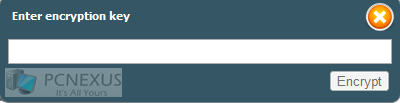
5.now click encipher it on the bookmarks bar.It will ask you an encryption key.Just type in the key and you are done.
encipher

6.now send the message to your friend.He/She will receive the encrypted message.He/She will need the decryption key at his/her end to view the message.Just tell him the decryption key and he will be able to view the encrypted message on facebook.

End Note: this is a cool and useful trick for various facebook users because we know that any time the security of our identity may be compromised any time on the web by many intruders.So while sharing sensitive information we should use this facebook trick in order to achieve maximum security if you are in public places like cafes.You are not aware that who is monitoring you on the network and is waiting for a correct chance to break into your accounts and steal your sensitive information.So it's better to take precaution if you are doubtful about your network security.However this facebook trick also works on gmail as well.The procedure is same,type your message and encrypt it with the key.But remember to mail the key also otherwise it will not be decrypted.Choose the key smartly.Use characters,uppercases and special symbols to increase security of your message.